Real Retail & Showroom Installations
Actual SmartScheduler screens in Malaysian retail and showroom spaces.
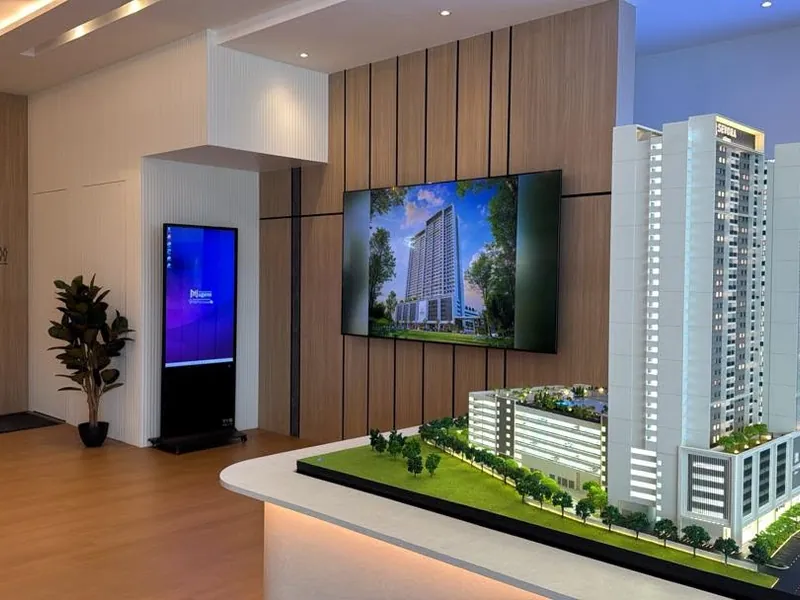
Replace printed POP with digital signage screens you control from a dashboard. Change prices and push campaigns across all outlets at once. Works offline. One-time payment.
Bayaran sekali. Tiada bayaran bulanan. Bermula RM1,499.
Actual SmartScheduler screens in Malaysian retail and showroom spaces.
Printed POP materials take days to produce and cost money every campaign. Screens are a one-time setup.
Launch a campaign and all store screens update at once. No couriering printed materials, no calling each outlet manager, no waiting for staff to swap displays.
Set a sale to start Friday at 10am and end Sunday midnight. The screen switches content automatically. Your team does not need to be in the store.
KL Mid Valley shows different pricing from Penang Gurney. Regional promotions, local stock availability, outlet-specific campaigns, all managed from one account.
Any TV or monitor with an HDMI port works. Plug in the Windows media player, connect to your existing display, and you are running. No new hardware purchase required.
Push promotions, sale banners, and product highlights to every branch's digital signage display at once. True multi-branch remote control. No USB drives, no emailing staff, no waiting for head office approval.
A 10-outlet retail chain in Klang Valley currently distributes printed POP (point-of-purchase) materials to each store every campaign cycle. Here is what they spend, and what SmartScheduler costs by comparison.
| Cost item (10 outlets, monthly campaigns) | Printed POP | SmartScheduler |
|---|---|---|
| Printing (3 banners × 10 outlets × RM35) | RM 1,050 / month | RM 0 |
| Courier to outlets (RM30 × 10 outlets) | RM 300 / month | RM 0 |
| Outlet-staff time installing banners (15 min × 10 outlets × RM12/hr) | RM 30 / month | RM 0 |
| Disposal of expired banners | RM 50 / month | RM 0 |
| Hardware investment (10 screens, one-time) | - | RM 54,990 (one-time) |
| Total over 36 months | RM 50,760 | RM 54,990 |
| Total over 60 months (5 years) | RM 84,600 | RM 54,990 (saving RM 29,610) |
*Numbers are illustrative for a 10-outlet retail chain. Actual savings depend on campaign frequency, outlet count, and existing print costs. The crossover point, where SmartScheduler costs less than continuing print, typically lands at month 32–40 for a 10-outlet chain. Past that, every month is pure operating-cost reduction.
Beyond the cost savings: SmartScheduler also gives you campaign-launch precision (every outlet starts the campaign at the same minute, not "whenever the banner shows up"), instant updates (typo on a price banner caught Tuesday morning fixed by Tuesday afternoon at all 10 outlets), and zero physical waste. Print POP, even with the best logistics, lands in landfills.
Patterns we see from chains 90+ days into rollout. Avoid these and the system delivers the campaign-velocity gains it should.
Head office wants every outlet running identical content. Reality: each outlet has local quirks. Mid Valley's afternoon foot traffic is different from KLCC's. Start with 80% centralised content + 20% outlet override. SmartScheduler supports this via the Central Control package: push the brand campaign hotel-wide, but leave each outlet 1–2 slots to insert their own daily promo.
A retail screen in a quiet showroom playing the campaign video at full volume on loop irritates staff faster than it irritates customers. Default all retail screens to muted unless the venue is loud (mall atrium) or sound is the point (DJI demo unit showing drone audio). Mute, then enable sound where it earns its way in.
Hari Raya promo running on the second Saturday of Syawal looks like the brand can't keep up. Set explicit end-times on every campaign at upload, not "I'll remove it later." If your campaign ends Sunday midnight, set end-time Sunday 23:59. Saves face when a customer walks past on Monday.
Showrooms have 55"+ landscape screens. Mall pop-ups have 43" portrait. A campaign visual designed for landscape looks awful when scaled to portrait. Brief your designer with both aspect ratios from the start, or pick one orientation and lock all your hardware to it. Decathlon runs landscape across all stores; DJI runs portrait at counters and landscape on demo units. Pick a side.
The screen also handles operational comms: staff training videos pre-opening, store-rules on safety, customer-feedback QR codes for VOC. Marketing dominates the schedule but doesn't have to monopolise it. Block 5 to 10% of the schedule for ops/HR. It's free real estate that head-office HR will thank you for.
Most retail chains never measure conversion lift from signage. The minimum-viable measurement: when you launch a screen-promoted SKU, watch unit sales of that SKU vs unsigned outlets the week of the campaign. If your chain has 10 outlets but only 6 have signage running, you have a control group built in. Track it for 3 campaigns and you'll know the real ROI of your screens.
Want our retail rollout playbook? WhatsApp us "Retail playbook" and we'll send a PDF with the 80/20 content split, screen-orientation policy, end-time discipline checklist, and the simple A/B measurement template.
From single-outlet showrooms to national retail chains.
Showroom display screens for vehicle and accessory promotions
Automotive ShowroomIn-store product showcase and campaign display screens
Electronics RetailSports category promotions and seasonal campaign screens
Sports RetailShowroom product feature and installation offer displays
Home AppliancesMulti-outlet retail screen management from a central dashboard
Retail ChainOne-time. No monthly fee. No per-screen subscription.
Add SmartScheduler to your existing store TVs. No screen replacement needed.
Multi-branch with central control from RM3,999 per screen. Bundle discounts available for 3+ screens. Ask on WhatsApp.
We have 12 outlets across Malaysia. Can we manage everything centrally?
Yes. All screens across all outlets are managed from one web account. You can push a single campaign to every screen at once, or set different content per outlet or per region. There is no additional cost per branch. You pay once per screen, and that is it.
Our store is in a mall with unreliable WiFi. Will the screens still work?
Yes. SmartScheduler stores content locally on the Windows media player. The screen plays your scheduled content regardless of WiFi status. Internet is only needed when you push new content from the dashboard.
What file formats can we use for in-store content?
Images (JPG, PNG, WEBP), videos (MP4, MOV), and PDFs all work directly. Since the system runs on Windows, your existing marketing materials work as-is. No conversion or special format required.
How quickly can a store manager update pricing on the screen?
Log into the dashboard, upload the new price image or slide, assign it to the relevant outlet screens, and publish. Under two minutes for a simple price update. Content goes live on screens immediately after publishing.
Can I swap the promo from my phone when a promotion changes?
Not on SmartScheduler. Promo changes are made at the media player, and the trade is that the screen keeps playing without internet and costs nothing monthly. If your promos change often and you want to do it from your phone, a cloud platform is the better fit. Layar is a Malaysian one, from RM19 a month, with a free plan to try first.
SmartScheduler powers screens across every industry in Malaysia.